
WORKDAY AND POWER BI
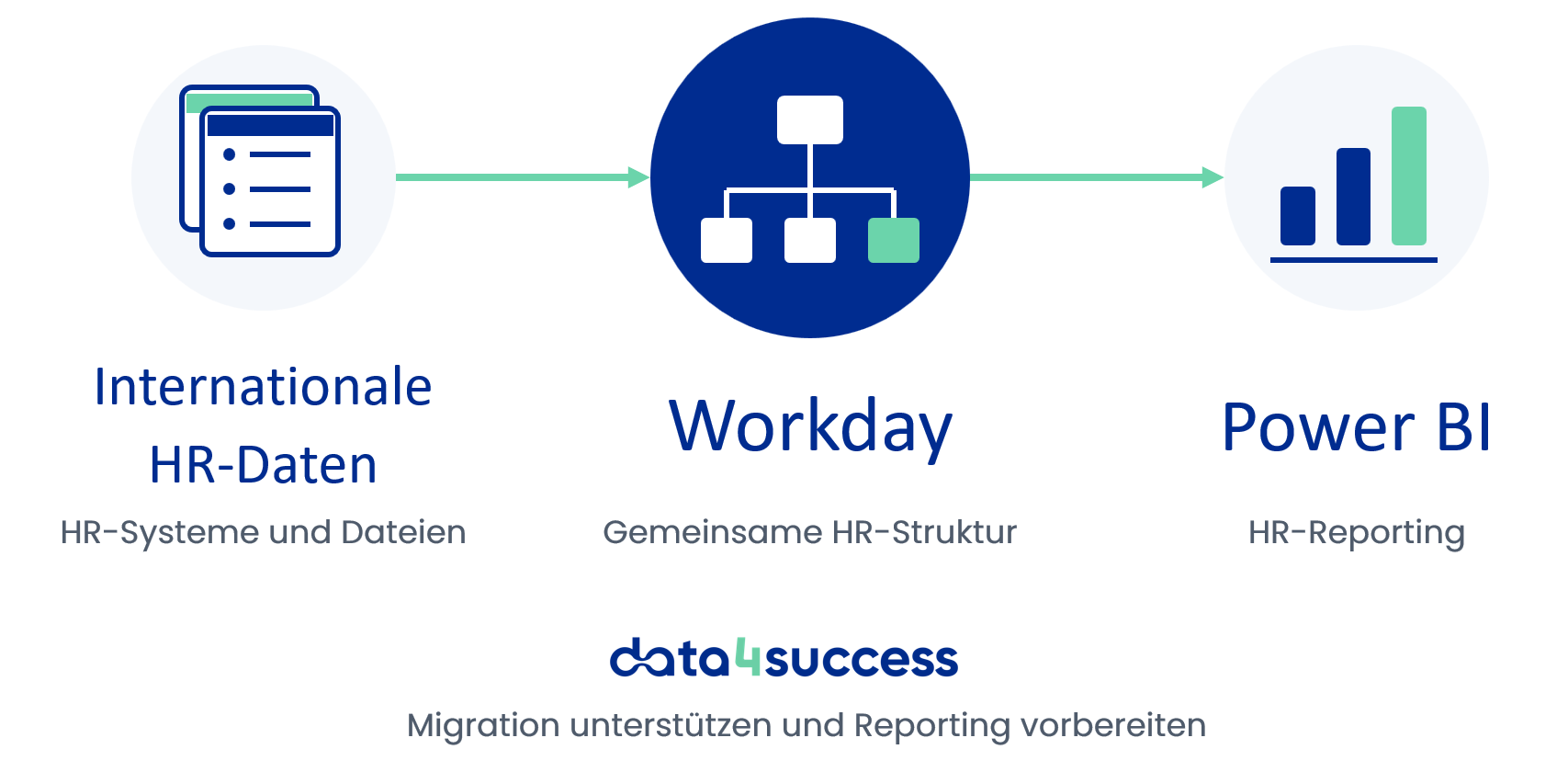
When implementing Workday, HR data, organizational structures, and country-specific information from various systems must be migrated into a common target structure. We help you prepare this data in a controlled manner, migrate it in a repeatable way, and thus create a reliable foundation for future HR reporting with Power BI.
INTERNATIONAL HR DATA
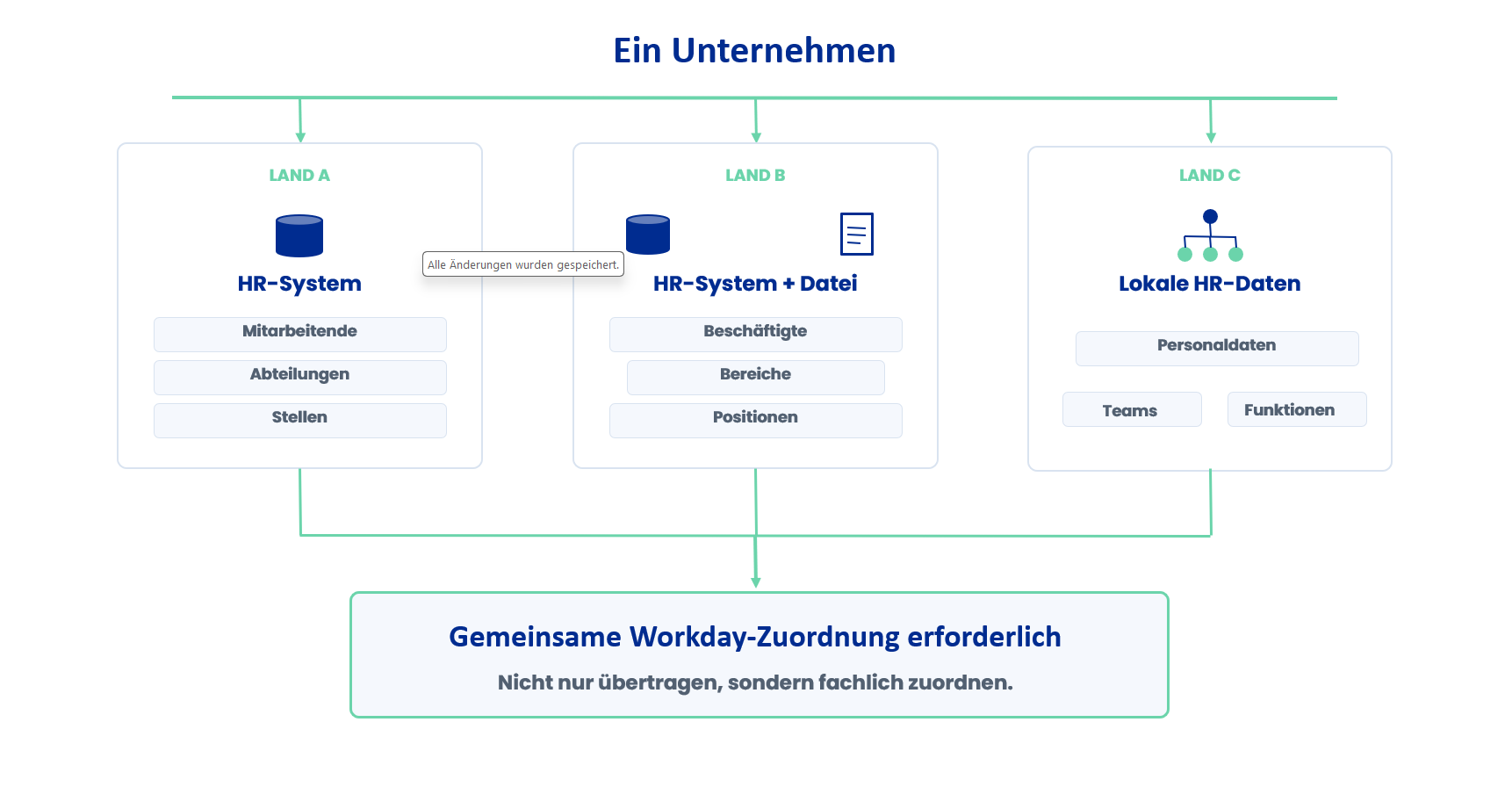
International companies often manage personnel data across different countries, subsidiaries, and HR systems. Job titles, formats, hierarchies, and functional assignments can vary significantly.
For the Workday implementation, this information must be reviewed, categorized by business function, and mapped to a common target structure. Only then can a reliable foundation be established for consistent master data and future analyses.
TYPICAL CHALLENGES
Before data can be transferred to Workday, it is necessary to understand the sources, structures, and business relationships. This becomes particularly challenging when information from multiple countries and systems must be consolidated and verified repeatedly.
HR data often comes from various systems, local databases, and supplementary files. For the migration, it is necessary to determine which information is relevant and how it can be processed collectively.
Terminology, formats, hierarchies, and mappings may vary across countries, companies, and existing HR systems. Information that is substantively comparable must be identified and mapped to a common target structure.
If data is repeatedly exported and manually adjusted in Excel, this results in time-consuming correction cycles. Changes should therefore be able to be incorporated into subsequent test and migration runs in a traceable manner.
When it comes to HR data, the scope of the data, its processing, storage, and access rights must be carefully coordinated. Migration data and subsequent reporting data must be considered separately.
STRUCTURED DATA MIGRATION
A reliable Workday migration begins with a clear understanding of the existing data and the intended target structure. Building on this foundation, data preparation, mapping, and quality checks are designed so that corrections can be incorporated into subsequent migration runs in a traceable manner.
Existing HR systems, local databases, and supplementary files are reviewed and categorized according to the scope of the migration.
Fields, formats, and content are prepared for further processing according to agreed-upon rules.
Source fields and values are mapped to the designated Workday structures and business terms.
Completeness, formats, mappings, and technical plausibility are checked against defined rules.
Changes made during test runs are incorporated into subsequent deployments in a traceable manner, without having to rebuild each step from scratch.
A key step is the technical harmonization of various terms and structures.
TECHNICAL HARMONIZATION
Departments, functions, locations, and other HR attributes may be labeled and organized differently across countries or systems. To establish a common Workday structure, it is therefore necessary to determine which values are functionally comparable, which specific characteristics should be retained, and where further clarification is needed.
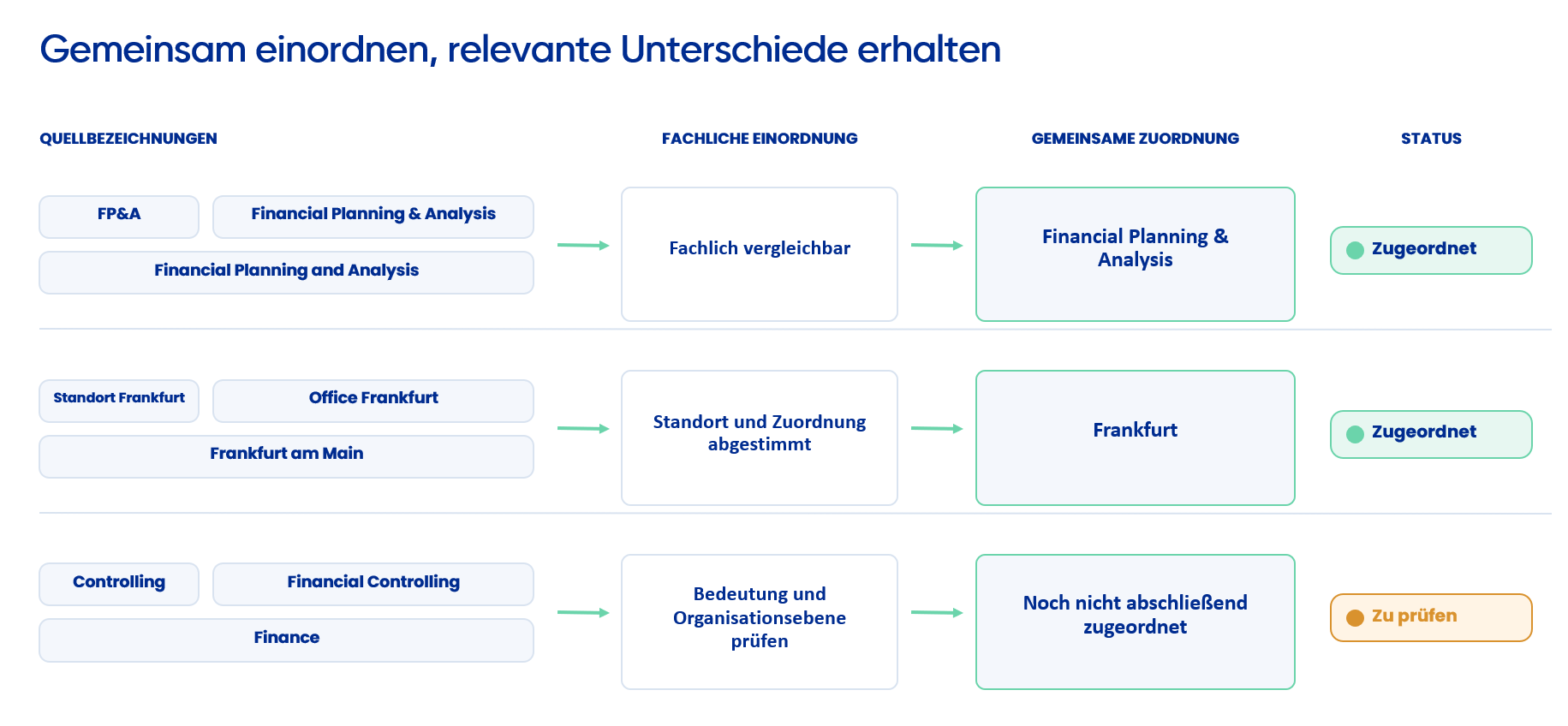
Transparent mappings create a common foundation for Workday and subsequent analyses. For reporting purposes, the specific migration data that is actually needed is then determined.
MIGRATION AND REPORTING
The Workday migration may require detailed information, mappings, and test environments. For subsequent HR reporting, however, specific decisions are made regarding which data is needed, the level of detail at which it is provided, and who is authorized to access it.
This does not automatically transfer all migration data to Power BI. The reporting framework is designed to address the intended questions, target audiences, and permissions.
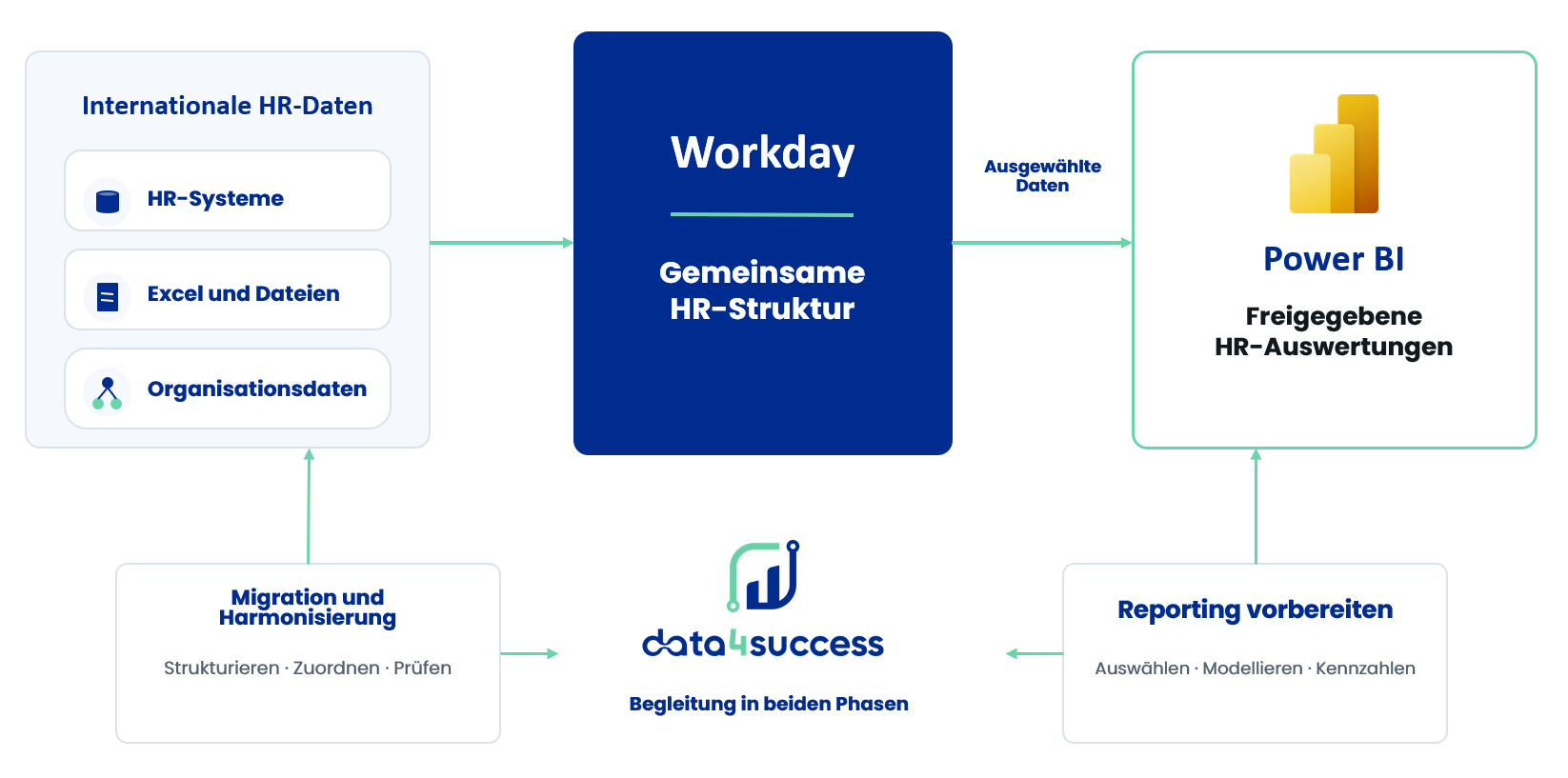
Migration and reporting are based on a common technical foundation, but differ in terms of data scope, level of detail, and access rights.
ONGOING DATA QUALITY
Data quality is not a one-time task that ends with the migration to Workday. New master data, organizational changes, and ongoing adjustments can result in missing information or mismatched assignments. Targeted data quality reporting regularly highlights selected areas for review and identifies where business-specific verification is required.
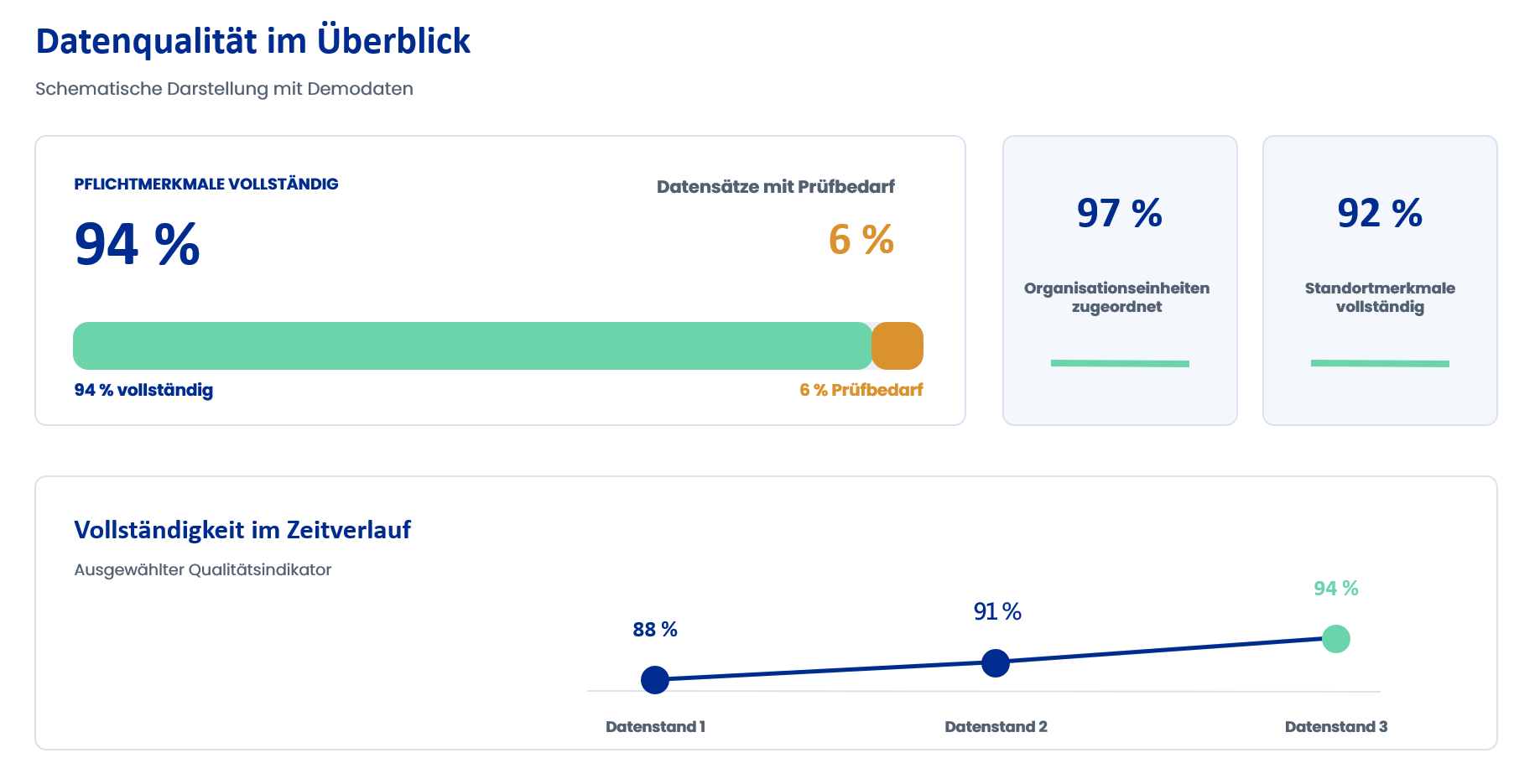
Required attributes, formats, and intended mappings
Companies, Locations, and Organizational Units
Job Status, Functions, and Functional Assignments
Groupings, Time References, and Required Attributes
Power BI highlights anomalies. The technical evaluation and correction remain the responsibility of the designated personnel and processes.
HR Reporting with Power BI
Based on a structured and technically aligned data foundation, approved Workday data can be prepared for various HR-related analyses. Which analyses are appropriate depends on the available data, the business requirements, and the respective authorization scheme.
Examine the trend in headcount by time period, company, location, or organizational unit. If appropriate and approved data is available, personnel costs can also be included at an agreed-upon level of aggregation.
Workforce
Full-time equivalents
Personnel Costs
Trends Over Time
Organizational Structure
Analyze companies, locations, and organizational units using a common framework. This makes distributions, changes, and missing assignments transparent.
Workforce by Company
Organizational Units
Incomplete assignments
Workforce by Location
Organizational Changes
Examine hiring, turnover, and staff turnover trends across defined time periods and organizational levels. This makes changes visible without placing individual employees at the center of the analysis.
Admission
Resignations
Net change
Turnover rate
Trends Over Time
Job openings, filled and unfilled positions, and selected planning information can be compared, provided the necessary data is available in an appropriate format. This provides a basis for analyzing current and planned structures.
Number of Open Positions
Filled Positions
Job Openings
Staffing Rate
Planned Positions
Available capacity and absences can be viewed at an appropriate level of aggregation. This makes it possible to track changes over time and within the organization.
Available Capacity
Days of Absence
Absenteeism Rate
Trends Over Time
Organizational Comparison
Selected quality indicators can be analyzed by data status, organizational unit, or functional audit area. This reveals where information is missing, where classifications need to be verified, or where data quality has changed.
Completeness Rate
Records Requiring Verification
Missing Required Attributes
Assignment Status
Quality Improvement
All analyses are based on standardized structures, defined metrics, and approved data. The following schematic example shows what a shared view in Power BI might look like.
EXAMPLE VIEW WITH SAMPLE DATA
The following diagram illustrates how selected Workday data can be consolidated in Power BI and prepared to provide different perspectives on headcount, changes, and staffing.
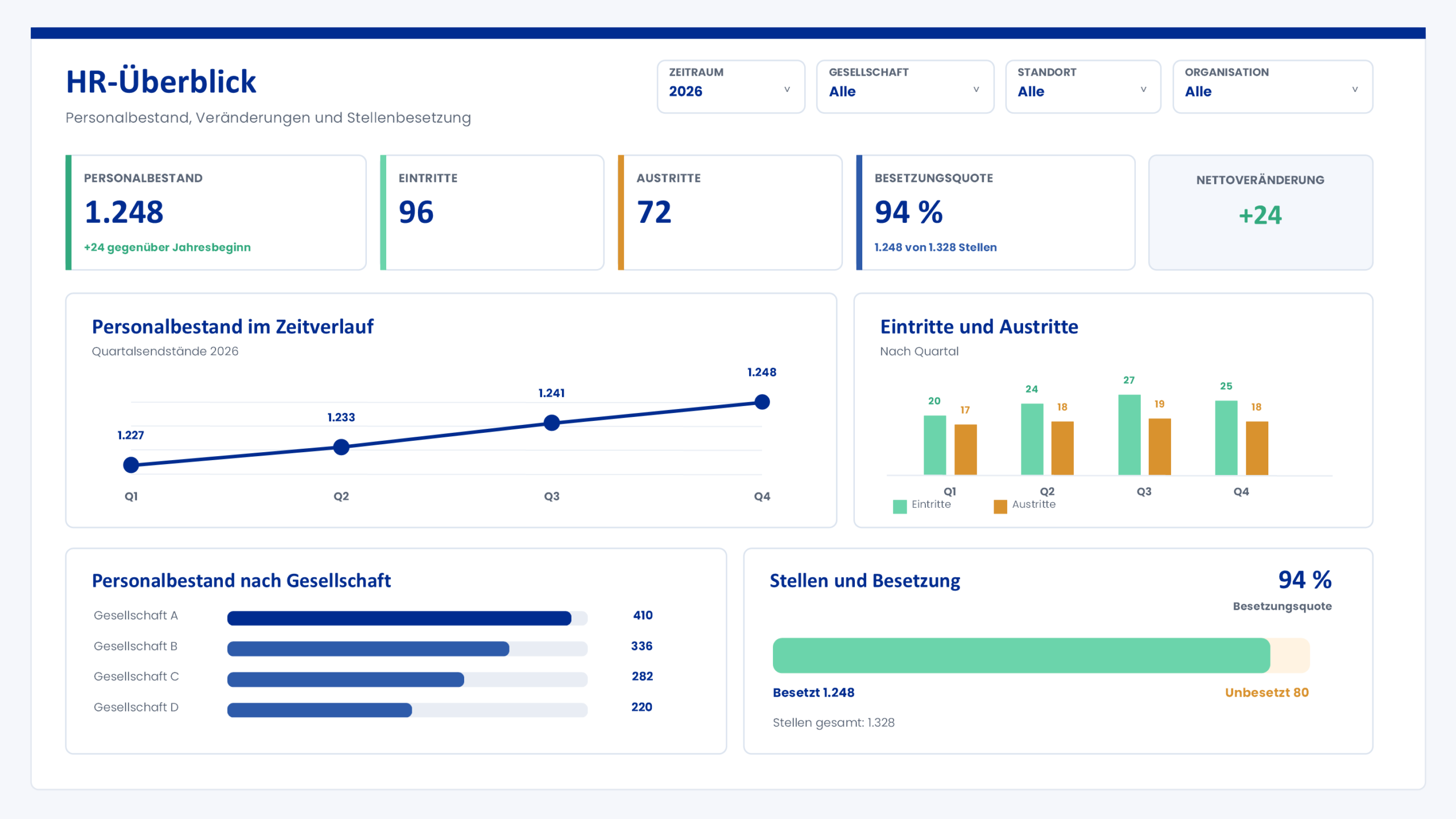
Schematic example view with sample data. The scope, key metrics, and presentation depend on the available data, requirements, and permissions.
A shared database ensures consistent metrics and enables different views for the intended recipient groups.
PRIVACY AND PERMISSIONS
HR data may contain personal information and information requiring special protection. For this reason, the scope of the data, level of detail, processing, and access rights are coordinated as early as the planning phase of migration and reporting.
01
For migration and reporting, the specific information that is actually needed is determined on a case-by-case basis.
02
For each analysis, it is determined whether aggregated metrics, organizational levels, or more detailed information are required.
03
Roles, areas of responsibility, and intended recipients are taken into account in the authorization and provisioning plan.
04
Data sources, business classifications, validation rules, and calculation logic are documented in a transparent manner.
It is not the maximum amount of available data that determines the solution, but rather the scope of data that is required for the specific purpose and has been agreed upon.
The technical implementation will be adapted to the existing system landscape as well as to requirements regarding security, data protection, operations, and deployment. As part of this process, we will assess how Workday data and other approved information can be made available for the intended analyses.
Whether an existing data platform is used, a separate reporting framework is established, or a cloud-based extension is implemented depends on the scope of the project, the available data, and the technical requirements.
Business requirements, data scope, access, and technical implementation must all align.
JOINT APPROACH
We support Workday data projects from the initial assessment of the project’s status to a structured handoff. In doing so, we coordinate business requirements, data preparation, technical implementation, and reporting preparation with the relevant stakeholders.
Together, we review data sources, the target structure, the project scope, and existing conditions.
Technical requirements, necessary data, responsibilities, and planned analyses are defined jointly in concrete terms.
Data preparation, business-domain mappings, validation, and reporting preparation are implemented and coordinated step by step.
Rules, data sets, and results are documented in a transparent manner and made available for further use.
The specific scope of the project depends on your current situation, the available data, and the agreed-upon goals for migration and reporting.
FREQUENTLY ASKED QUESTIONS
The data required depends on the intended Workday target structure and the scope of the migration. This may include, for example, employee master data, organizational information, companies, locations, positions, roles, and other project-relevant attributes. We will work together to determine which sources are available and in what format the data can be provided.
Data from various HR systems, local databases, and supplementary files can generally be viewed together and structured for further processing. The specific integration depends on technical availability, data quality, and business requirements.
Terminology, hierarchies, and values are not automatically standardized. The team collaboratively determines which information is substantively comparable, which target mappings are intended, and which local specifics must be retained. Unresolved values can be flagged as requiring review and subsequently evaluated from a technical perspective.
Preparation, mapping, and testing steps can be structured in a traceable manner. This allows changes and insights gained from a test run to be incorporated into subsequent deployments in a controlled manner, without having to completely repeat all the steps. The specific process depends on the individual project and the planned migration procedure.
No. For reporting purposes, specific criteria are established to determine what information is needed to address the intended questions, the level of detail at which it is provided, and who is authorized to access it. Data is not imported into Power BI simply because it was available during the migration.
Depending on the available and approved data, you can analyze, for example, headcount, organizational structures, hires and separations, turnover, positions and staffing, capacity, personnel costs, or data quality. Which analyses are possible and useful depends on the Workday environment, the data provided, and the business requirements.
The scope of data, level of detail, processing, and access rights are tailored to the specific purpose and agreed-upon requirements. This involves determining which data is actually needed, which user groups are authorized to access it, and which technical implementation is compatible with the existing environment. The specific implementation is carried out in collaboration with the relevant functional, technical, and data protection stakeholders.
Different user groups may have different information needs and areas of responsibility. An authorization model can therefore ensure that users see only the information and organizational areas relevant to their tasks. The specific implementation depends on the technical environment, the data structure, and the agreed-upon access rules.
Yes, the reporting framework can be tailored to prioritize specific issues and approved data, and then gradually expanded later. This allows you to start by implementing selected metrics or quality indicators and then add additional organizational units, HR topics, or recipient views.
YOUR WORKDAY DATA PROJECT
Whether it’s international HR systems, Excel files, different organizational structures, or existing Workday data: Together, we’ll assess your current situation and determine how data migration, data quality, and future HR reporting can work together effectively.
The focus here is not on a pre-packaged, one-size-fits-all solution, but rather on a clear, step-by-step approach that is tailored to your data, responsibilities, and business requirements.