
SALES REPORTING BASED ON DYNAMICS 365
Conduct a structured analysis of the sales pipeline, forecast, and customer processes.
Show how leads turn into opportunities, how your sales pipeline is structured, and which deals are expected to close. To do this, we prepare relevant CRM data in a technically standardized reporting format for Power BI.
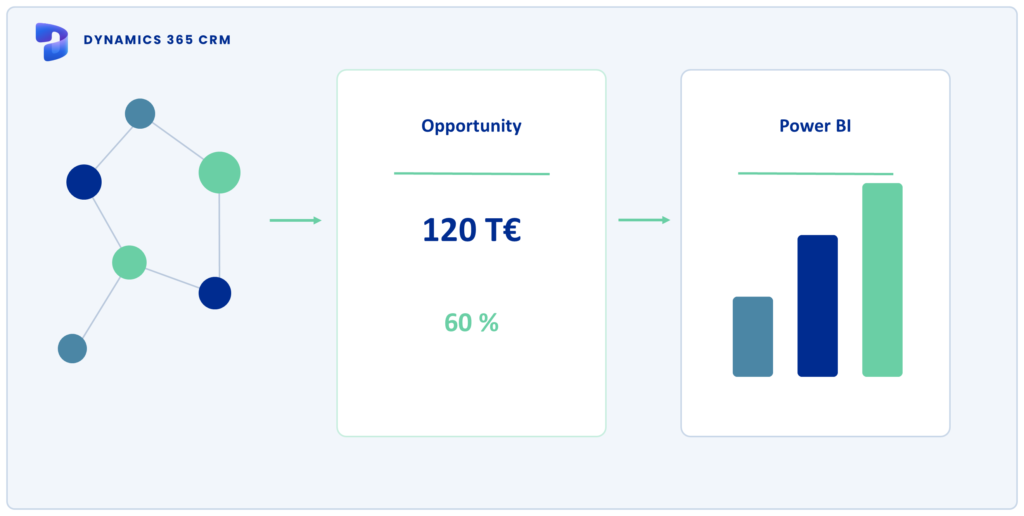
DATA IS AVAILABLE
Leads, opportunities, pipeline stages, and activities form an important foundation for reporting in Dynamics 365. To ensure that these data points yield reliable key performance indicators, status logic, probabilities, time frames, and organizational assignments must be coordinated with business stakeholders and consistently reflected in the reports.
Designations and transitions must align with the actual sales logic so that opportunities can be categorized and compared in a transparent manner.
Closing probabilities affect the weighted pipeline. Their usefulness depends on the criteria used to determine them and how consistently they are maintained.
Expected closing dates, status changes, and actual closing dates require clear temporal assignments for trend analysis and period-to-period comparisons.
Teams, regions, products, and areas of responsibility must be assigned in such a way that key performance indicators can be analyzed at the appropriate organizational level.
For transparent pipeline, forecast, and management analyses.
REPORTING AREAS
From sales pipeline development to customer and service processes: Power BI makes connections and changes visible. Which metrics are useful depends on your company’s processes, status logic, and management questions.
Analyze how opportunities are distributed across pipeline stages, time periods, and sales territories. Unweighted values show the total potential, while weighted values take closing probabilities into account; a forecast organizes expected closings by time and business area.
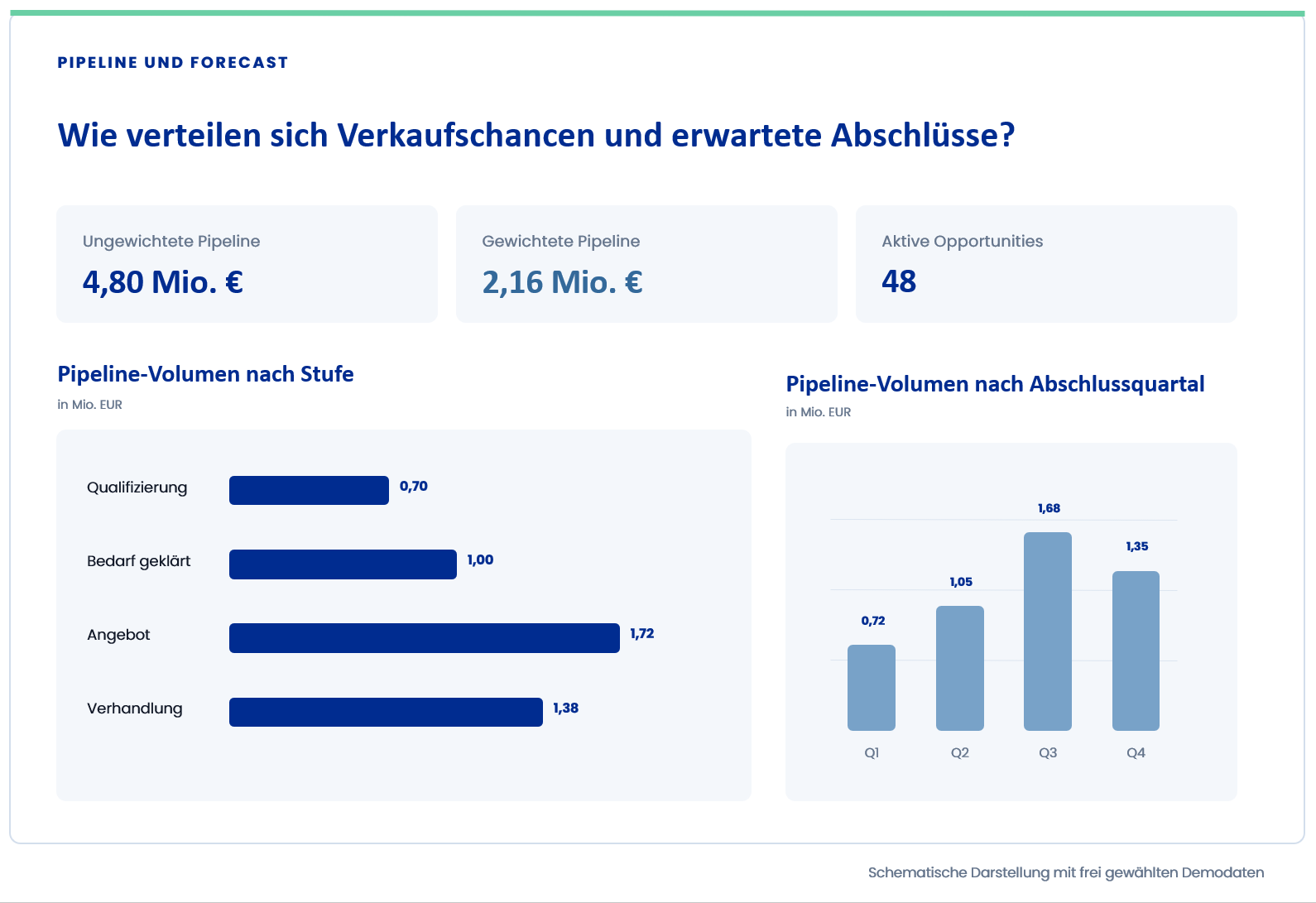
Weighted pipeline figures represent a valuation perspective and should not be equated with confirmed revenue or a professionally validated forecast.
Example of a Power BI report with sample data of your choice. Click on the report to enlarge it.
Compare won and lost opportunities and analyze at which stages sales opportunities progress or come to an end. Clearly defined metrics provide the foundation for transparent won/lost and conversion metrics.
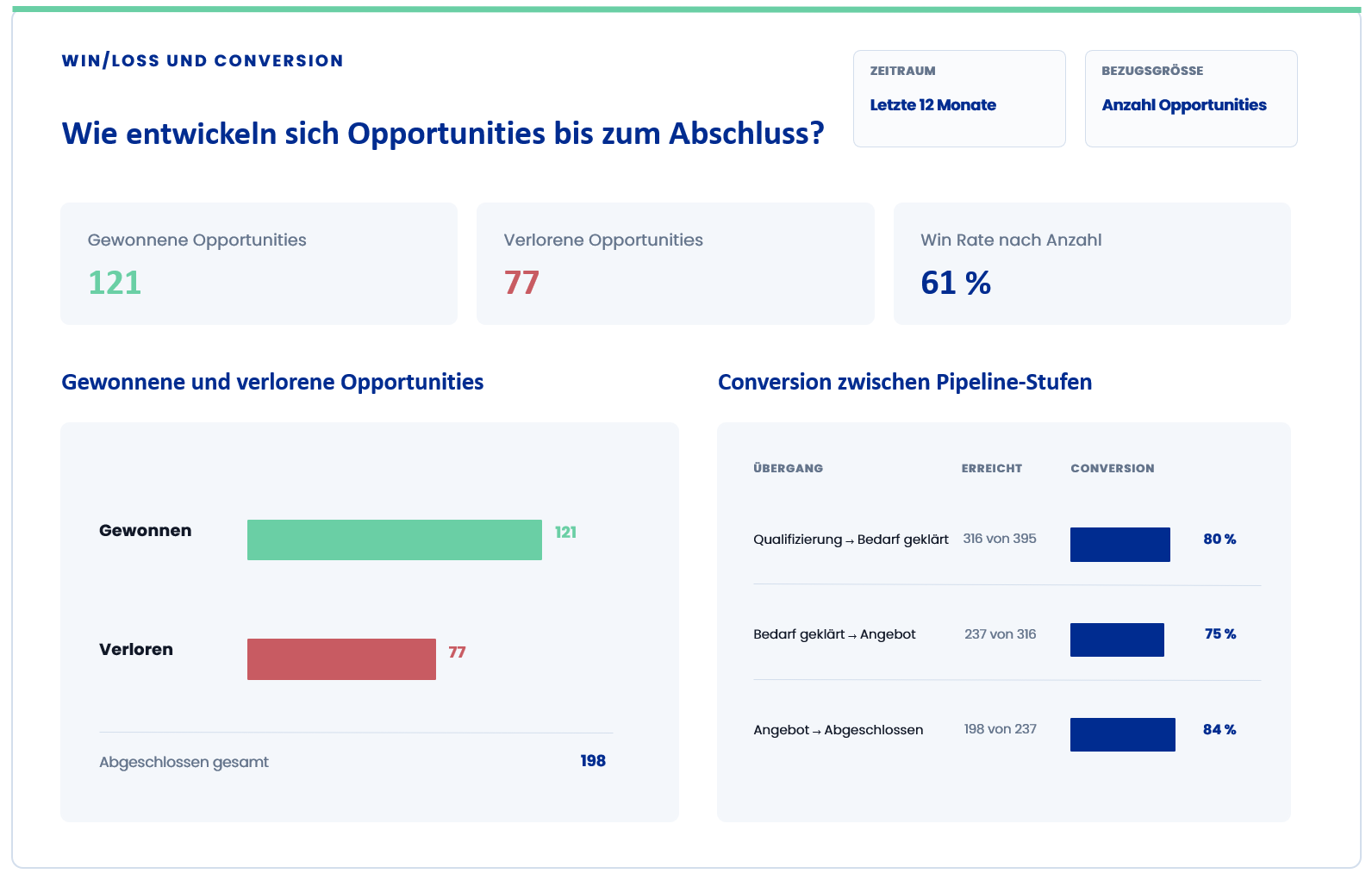
Example of a Power BI report with sample data of your choice. Click on the report to enlarge it.
Combine account, contact, lead, and opportunity data to create a comprehensive view of customer relationships. Additionally, activities and other interactions can be included, provided they are recorded consistently and are relevant to the specific issue at hand.
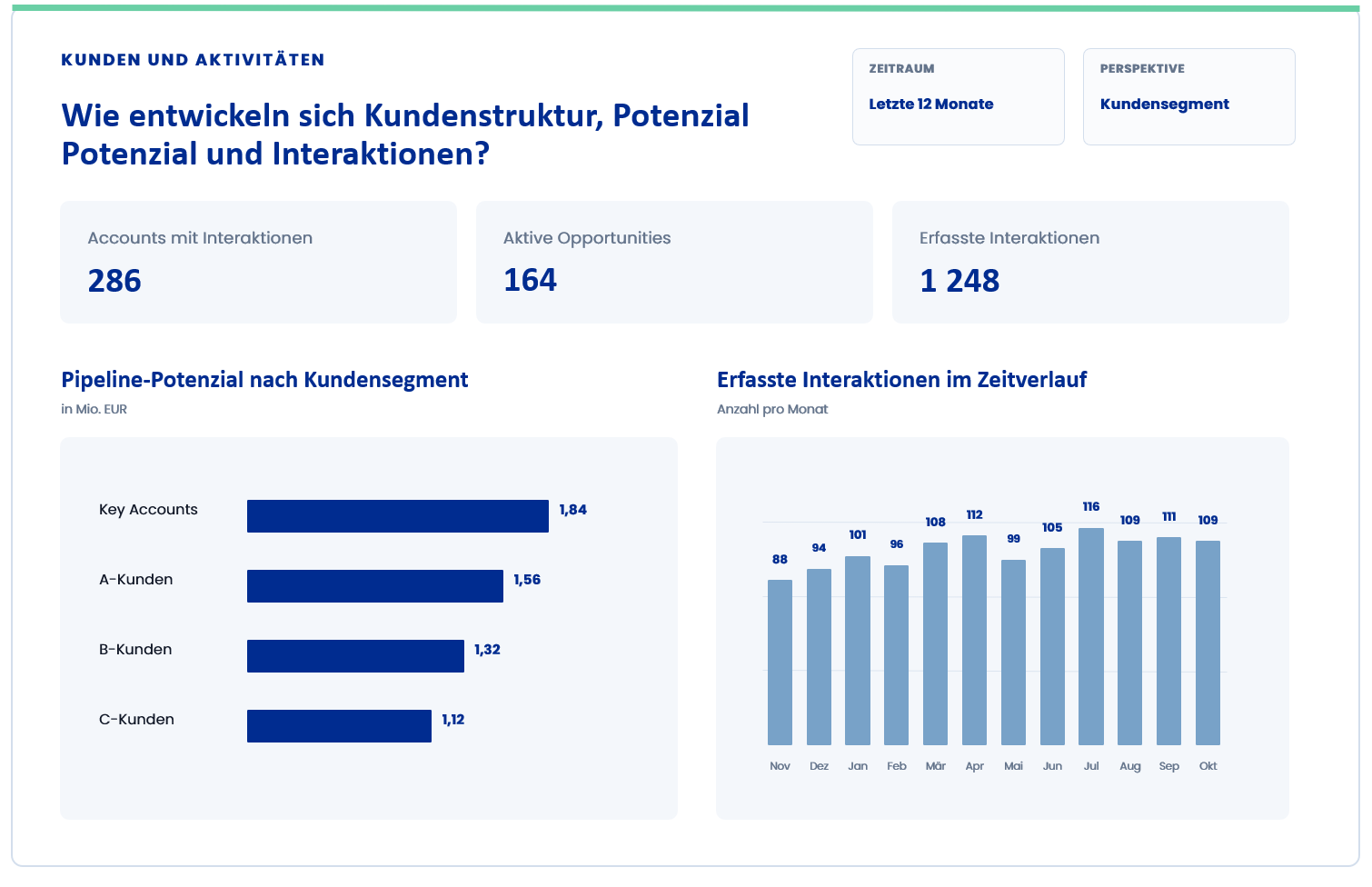
Example of a Power BI report with sample data of your choice. Click on the report to enlarge it.
Analyze service cases by status, priority, time period, and other business-specific characteristics. By linking this data to account and contact information, service trends can be viewed within the context of each customer, provided that the necessary relationships and data are consistently maintained.
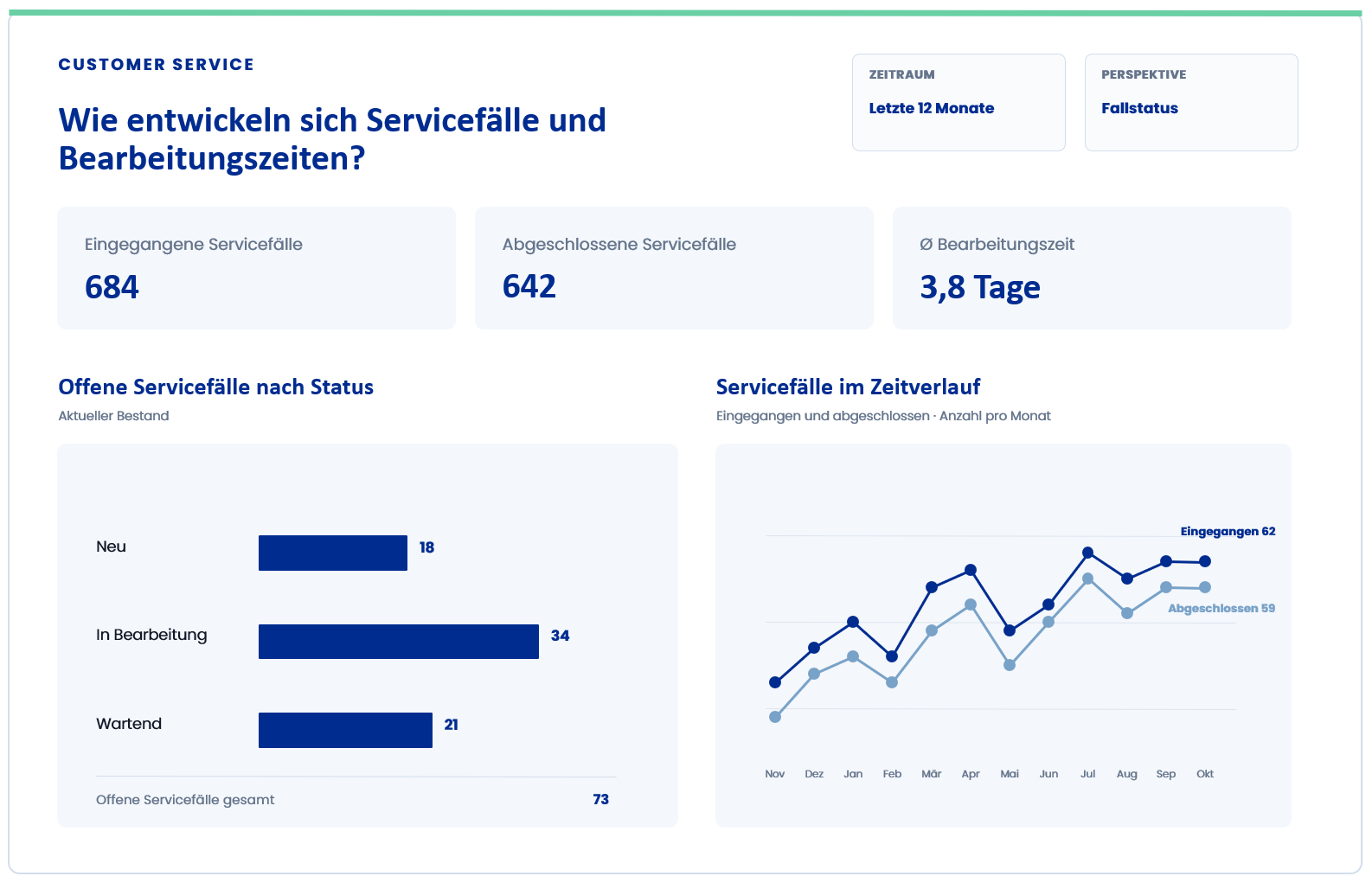
Example of a Power BI report with sample data of your choice. Click on the report to enlarge it.
Analyze how opportunities are distributed across pipeline stages, time periods, and areas of responsibility. Weighted and unweighted values provide different perspectives on existing potential and expected deals.
VISUAL PLACEHOLDER
Pipeline & Forecast
Compare won and lost opportunities and analyze at which stages sales opportunities progress or come to an end. Clearly defined metrics make won/lost and conversion metrics easy to understand.
VISUAL PLACEHOLDER
Won/Lost & Conversion
Combine account, contact, lead, and opportunity information to create a comprehensive view of customer relationships. Activities and marketing references can also be included, provided they are fully recorded and relevant to the specific issue at hand.
VISUAL PLACEHOLDER
Clients & Activities
Analyze open and closed cases by time period, category, channel, or responsible department. Processing times, escalations, and service-level metrics can be taken into account, provided that the necessary status and time information is reliably maintained.
VISUAL PLACEHOLDER
Customer Service
TWO REPORT FORMATS
Power BI reports and paginated reports meet different reporting needs. While Power BI enables interactive analysis and flexible control views, paginated reports are suitable for detailed analyses with a fixed page layout and parameterized output.
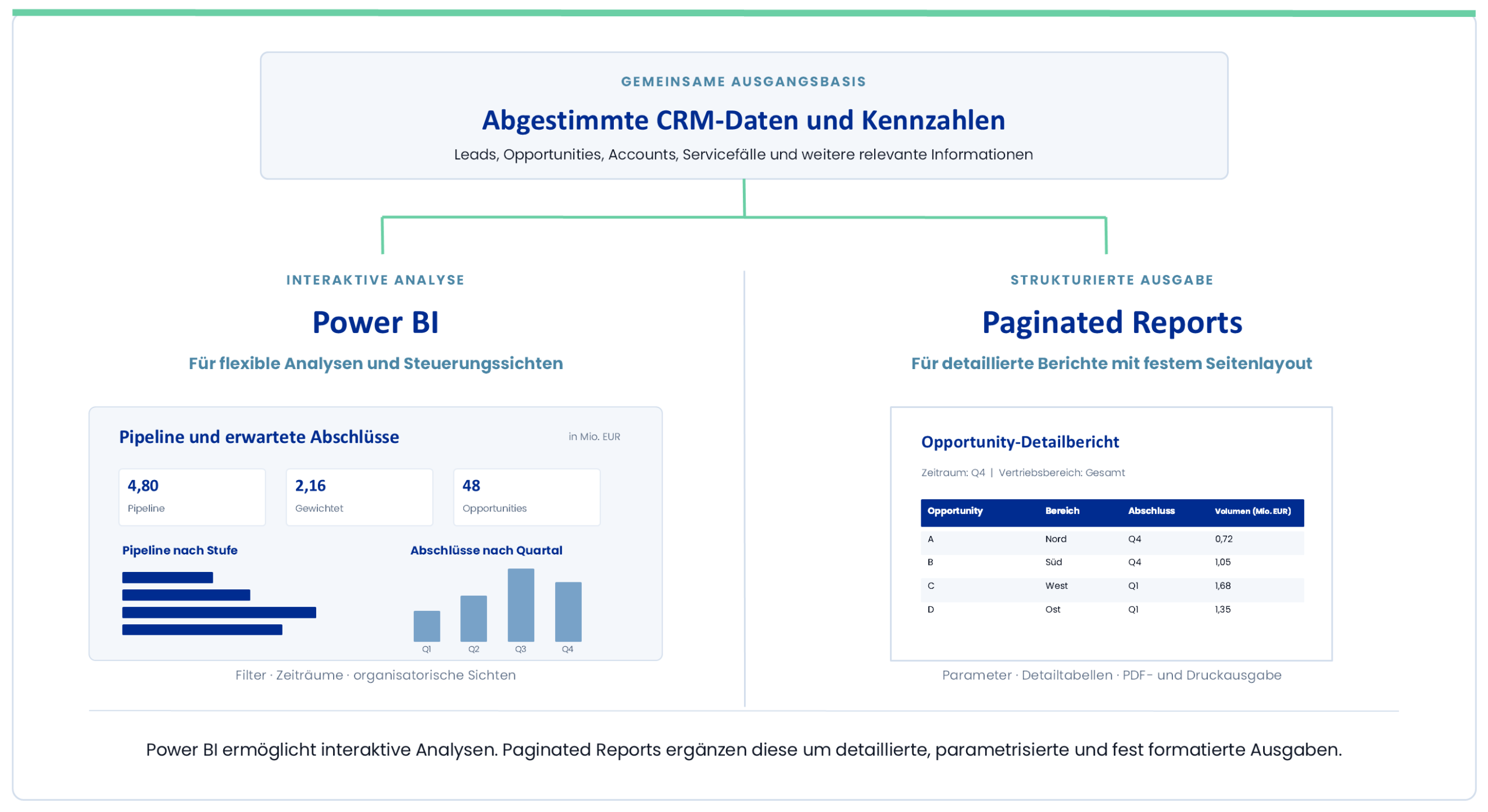
Schematic illustration using randomly selected demo data. Click on the illustration to enlarge it.
The common starting point is a conceptual framework, not a binding technical architecture.
TAKING CRM DATA A STEP FURTHER
CRM data shows sales opportunities and expected deals. By linking this data to order, invoice, financial, or budget figures, it becomes clear which expectations were actually met.
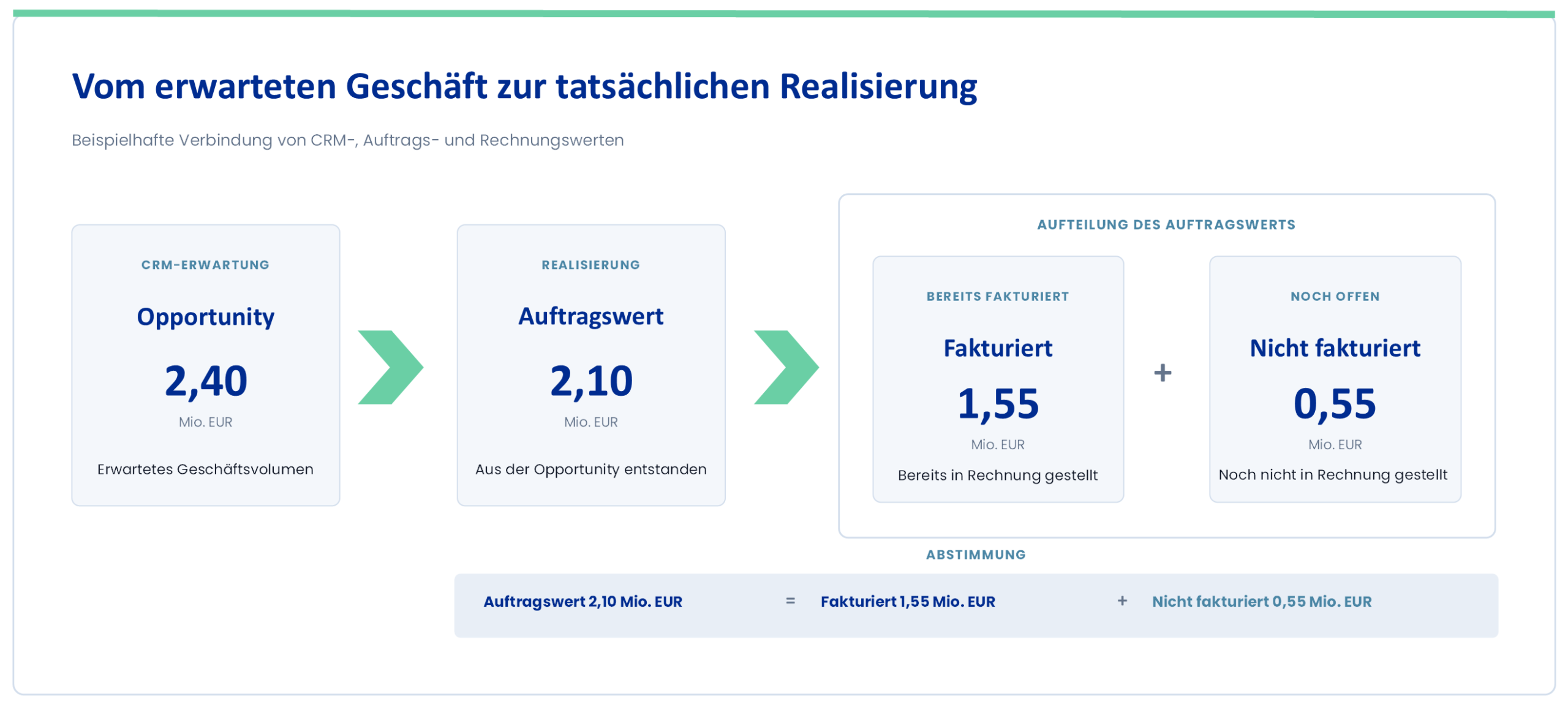
Opportunity volume, order value, invoiced value, and revenue must be distinguished from one another in business terms.
Schematic illustration using randomly selected demo data. Click on the illustration to enlarge it.
DATA AND ARCHITECTURE
The Dynamics 365 Customer Engagement applications used are based on Microsoft Dataverse. Which tables and information are relevant for reporting, and how they are prepared for Power BI, depends on the specific environment, its extensions, the required update cycles, and the existing data architecture.
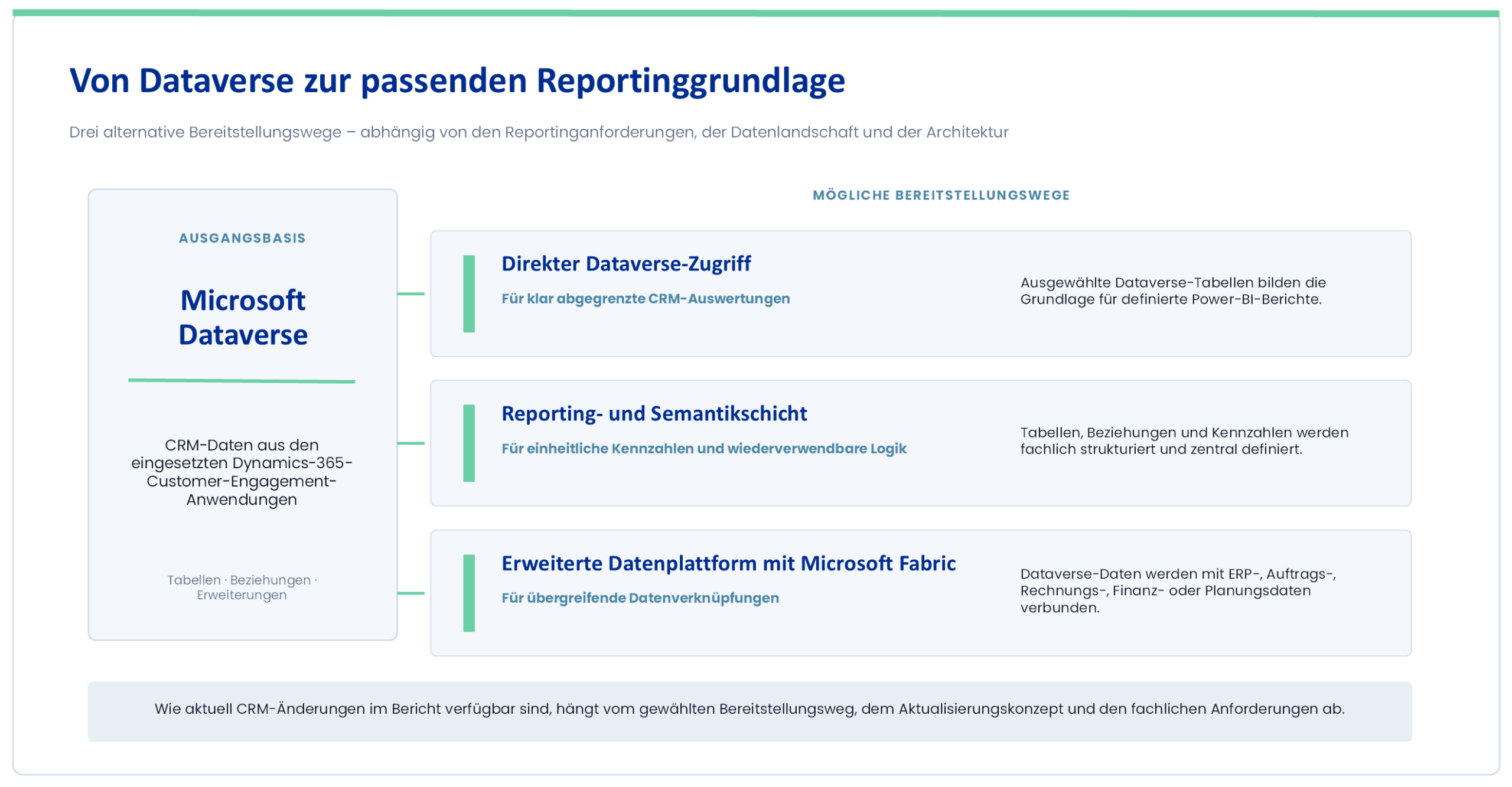
Click on the image to enlarge it.
ANALYZE RESPONSIBLY
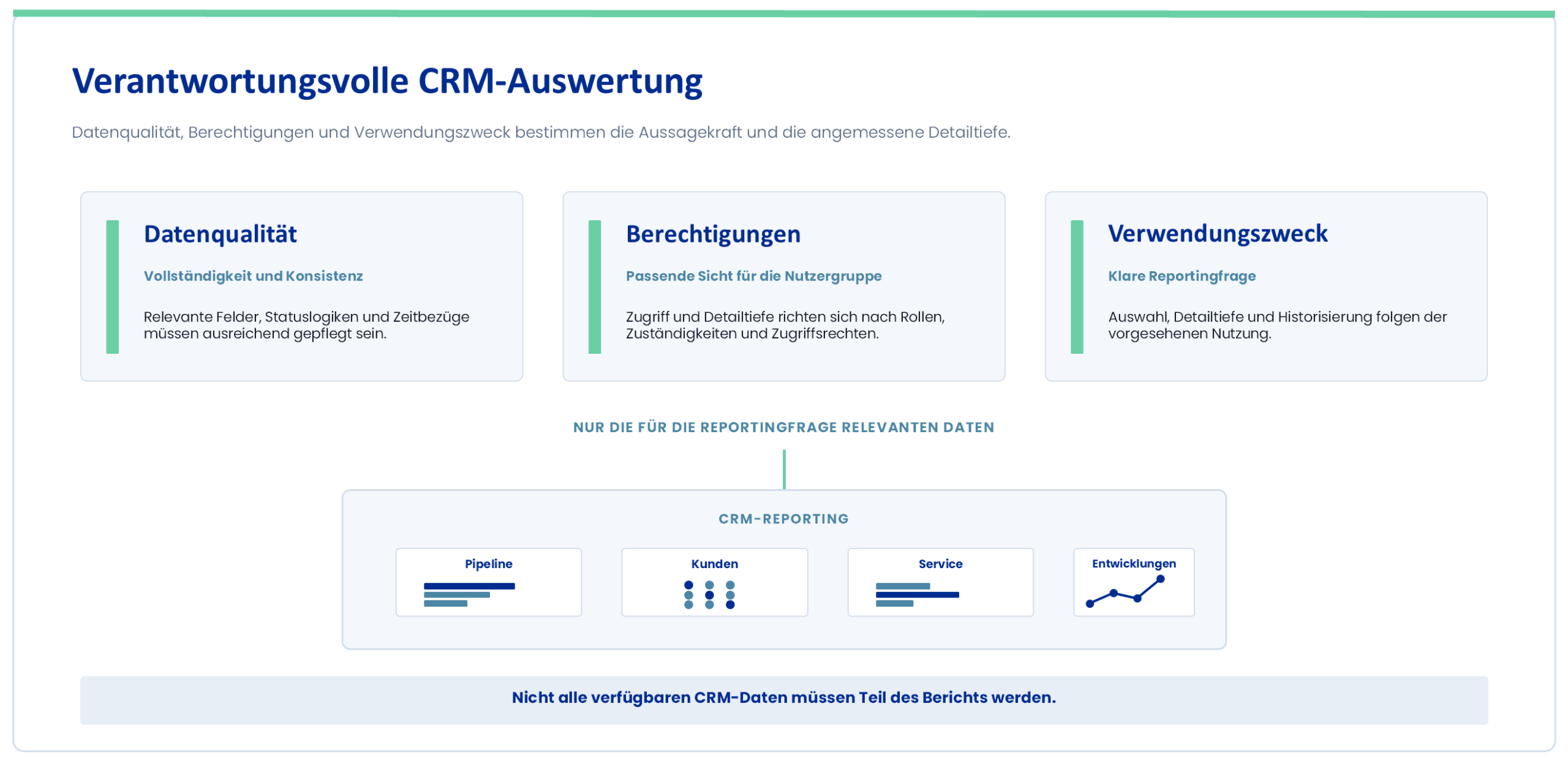
CRM data may vary in terms of completeness and consistency and may contain personal or confidential information. Reliable analyses therefore require adequate data quality, appropriate access permissions, and a clearly defined purpose.
Click on the image to enlarge it.
FREQUENTLY ASKED QUESTIONS
The specific data, report formats, and architectural components that make sense depend on the Dynamics 365 environment in use and the specific reporting requirements. We provide concise answers to the most important questions here.
Dynamics 365 CRM is a common term for customer-related Dynamics 365 applications. Microsoft uses the term “Dynamics 365 Customer Engagement Apps,” among others, to refer to these applications. These may include, for example, Dynamics 365 Sales, Customer Service, Field Service, or Customer Insights. Which data and processes are relevant for reporting depends on the specific applications in use and any custom extensions.
Depending on the applications in use and the processes maintained, you can analyze, for example, leads, opportunities, accounts, contacts, activities, and service cases. You must determine which tables, fields, and relationships are suitable for reporting based on your specific Dynamics 365 and Dataverse environment.
No. For clearly defined CRM analyses, Power BI can access selected Dataverse data. Microsoft Fabric can be useful if CRM data needs to be connected to ERP, financial, planning, or other business data, or integrated into a more comprehensive data and reporting landscape. The appropriate deployment method depends on the volume of data, the system landscape, the need for up-to-date information, and the existing architecture.
Power BI reports are suitable for interactive analysis, filtering, and various management views. Paginated reports complement these with detailed, parameterized reports featuring a fixed page layout—for example, for multi-page tables, as well as PDF or print outputs. The appropriate report format depends on the specific use case.
In general, CRM data can be combined with order, invoice, revenue, financial, planning, or other business data. However, whether the data can be unambiguously linked depends on common keys, business definitions, data quality, and access rights. In particular, opportunity volume, order value, invoiced value, and revenue must be clearly distinguished from one another.
The frequency of updates depends on the selected delivery method, the update strategy, and the business requirements. Depending on the architecture, data can be updated at specified intervals or retrieved from the respective source at the time of reporting. The required update interval should therefore be determined based on the specific use case.
YOUR NEXT STEP
Together, we'll review your Dynamics 365 environment, the relevant sales and service processes, and your existing reporting requirements. Based on this, we'll develop a functionally and technically appropriate foundation for Power BI and complementary reporting formats.